> For the complete documentation index, see [llms.txt](https://docs.scholars.net/llms.txt). Markdown versions of documentation pages are available by appending `.md` to page URLs; this page is available as [Markdown](https://docs.scholars.net/info/jobs.md).
# Jobs
Jobs are tasks you can be asked to do. Learn more about jobs on Scholars here.
To work and earn on Scholars, you must apply to and be part of jobs.
## What are jobs on Scholars?
On Scholars, employers create *jobs*, to which you can apply if you meet certain requirements. Once you are selected and hired for a job, then, you are bound to work on it until completion, for which you will be paid hourly.
## How do I apply for a job on Scholars?
Please consult the dedicated page on applying to jobs on Scholars, which also contains frequently asked questions about jobs and applying to them:
{% content-ref url="/pages/fWe4WThXMiFHPsJ7nqbm" %}
[Apply for a job](/how-to/apply-for-a-job.md)
{% endcontent-ref %}
## Where can I see the status of my job applications?
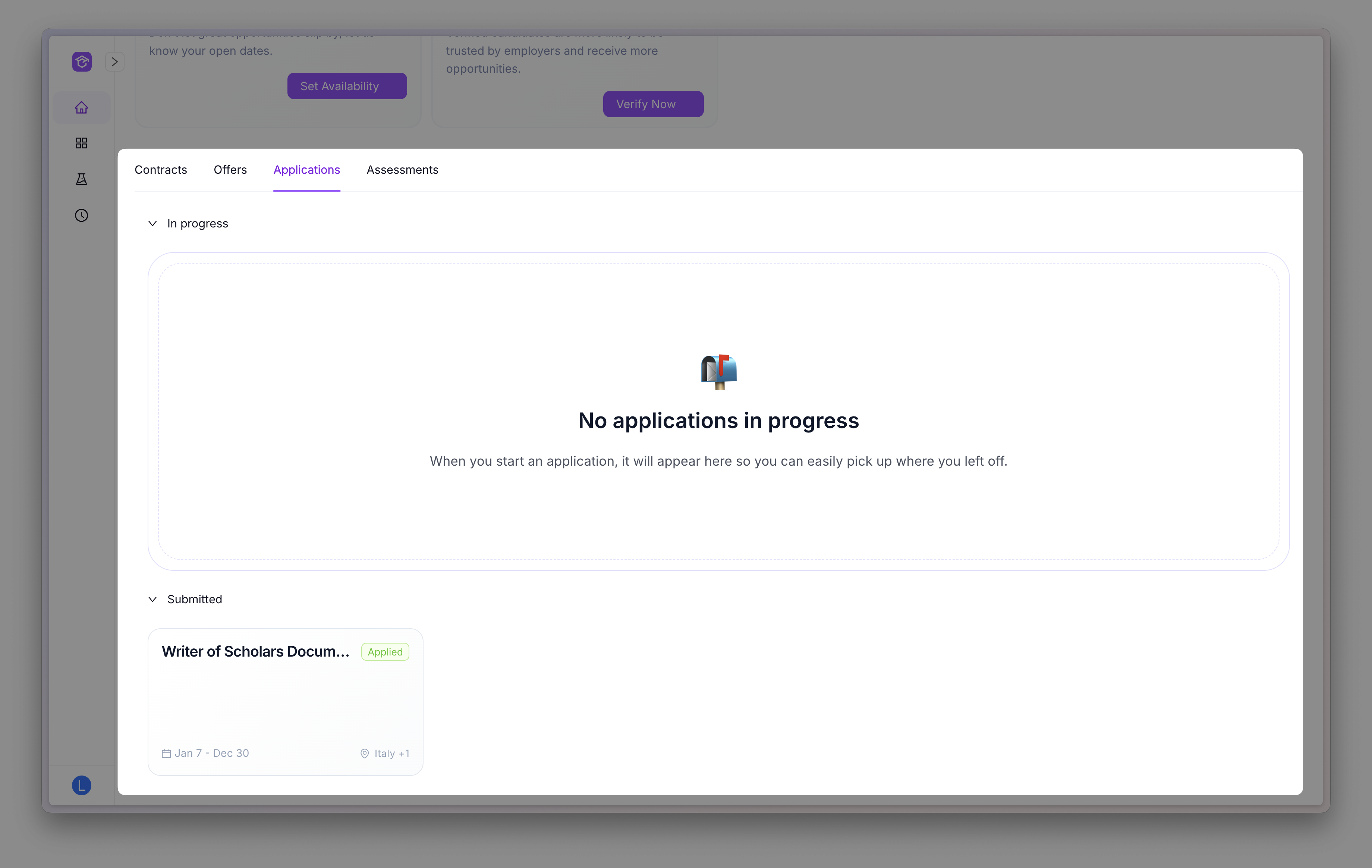
From the home page, click on the *Applications* tab to see all of your applications and their status:
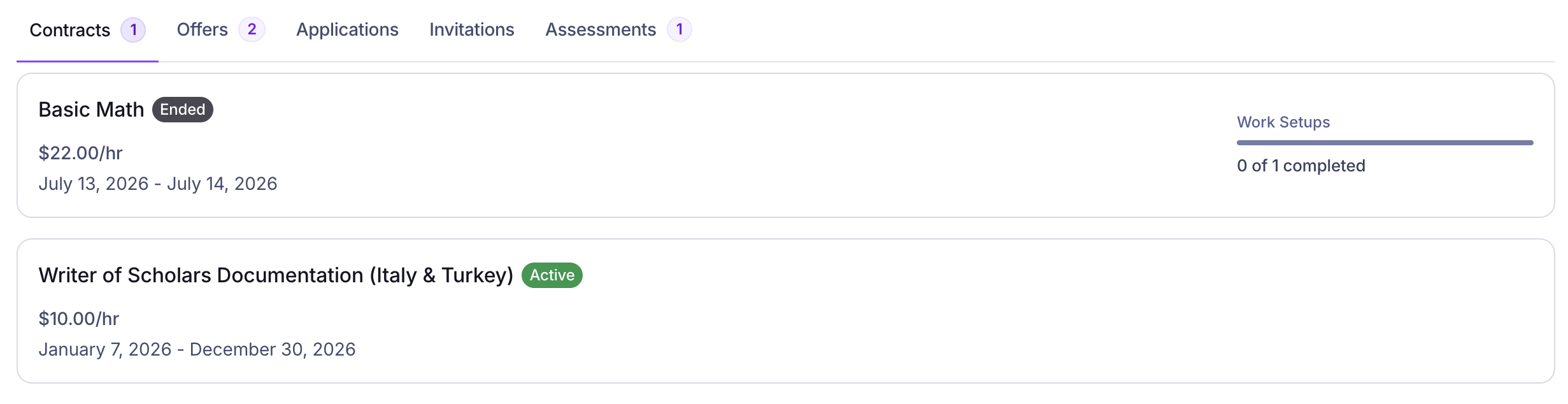
The home page tabs can show a small count next to the tab name when there are items waiting for you, such as pending offers, invitations, applications in progress, active contracts, or assessments in progress. If there is no count, there is nothing currently waiting in that tab.
## What are the different job application steps?
### Application Submitted
This is the first step. You have passed all of the required assessments and you have applied to a job.
You can learn more about how to apply for a job here:
{% content-ref url="/pages/fWe4WThXMiFHPsJ7nqbm" %}
[Apply for a job](/how-to/apply-for-a-job.md)
{% endcontent-ref %}
There is nothing you should do at this stage. If you are selected, our managers will let you know. In the meantime, you can take more assessments or apply to other jobs, if any.
If your application is rejected, Scholars may email you with the rejection message from the team that reviewed your application.
### Offer Sent
One of our managers has selected you for a job and has send you an offer. To see the offers you have received, go to the "Offers" tab.
Learn more about accepting or rejecting a job offer here:
{% content-ref url="/pages/u2LoBSeomScuIFgLNN0z" %}
[Accept or reject a job offer](/how-to/accept-or-reject-a-job-offer.md)
{% endcontent-ref %}
### Contract
If you accept an offer, it turns into a contract. You can see your active contracts in the *Contracts* tab of your home page.
Your active contracts are your active jobs, for which you have been employed.
#### Review your contract details
Open a contract from the *Contracts* tab to review:
* The job and project.
* The contract dates.
* The rate, payment type, and payment cycle.
* Any payment categories that apply.
The category rates shown on an offer or contract are saved for that agreement, so later changes to the job do not alter them.
Scholars also sends you an email when an accepted offer becomes a contract. The email includes key contract details and a link back to the contract in Scholars. You will be contacted by one of our project managers on how to work on the specific project.
#### Download your contract
Open your contract details and click *Download PDF* when the document is ready. If you see *Generating PDF...*, wait for the page to update. If it shows *PDF unavailable*, follow the message to contact support.
When a contract ends or is terminated, Scholars adds that event to its existing contract PDF. Download it again after the update is ready to keep a current copy.
#### Contract termination
If your contract is terminated, Scholars sends you an email with the termination date and a link to your contract. A terminated contract does not have the seven-day window for adding work or submitting timesheets that applies when a contract reaches its scheduled end date.
#### Complete your Work Setups
Your contract can also include *Work Setups* with instructions or reference material you need before starting. Open the contract and review each setup.
* Depending on its requirements, click *Mark complete* or upload the requested document and submit it for approval.
* If a document is rejected, review the reason, update it, and submit it again.
The contract card summarizes your Work Setup progress before you open it. It shows when every setup is complete, how many are complete when work remains, and whether a rejected setup needs your attention. Select the card or its Work Setup action to open the contract and continue.
The Contracts tab summarizes Work Setup progress on each contract card.
#### Track your work and get paid
Usually, you will have to record the time you spend working on a specific contract using our time tracker. Learn more about it here:
{% content-ref url="/pages/RcMb7KIv8jwqBvJyaMbl" %}
[Track the time spent on a job](/how-to/track-the-time-spent-on-a-job.md)
{% endcontent-ref %}
You will be then paid weekly according to how much time you spent on the project. See [this page on getting paid](/how-to/get-paid.md) for more.
---
# Agent Instructions
This documentation is published with GitBook. GitBook is the documentation platform designed so that both humans and AI agents can read, navigate, and reason over technical content effectively. Learn more at gitbook.com.
## Querying This Documentation
If you need additional information that is not directly available in this page, you can query the documentation by asking a question.
Perform an HTTP GET request on the following URL with the `ask` and `goal` query parameters:
```
GET https://docs.scholars.net/info/jobs.md?ask=&goal=
```
`ask` is the immediate question: it should be specific, self-contained, and written in natural language.
`goal` is what the user is ultimately trying to achieve, the reason they need the answer. Sharing it helps GitBook give you a better, more relevant answer. A goal is most helpful when it describes the outcome the user wants rather than restating the question. For example, with `ask=how do I create an API token`, a goal like `automate deployments from our CI pipeline` lets GitBook tailor the answer to that use case.
The response will contain a direct answer to the question and relevant excerpts and sources from the documentation.
Use this mechanism when the answer is not explicitly present in the current page, you need clarification or additional context, or you want to retrieve related documentation sections.