> For the complete documentation index, see [llms.txt](https://docs.scholars.net/llms.txt). Markdown versions of documentation pages are available by appending `.md` to page URLs; this page is available as [Markdown](https://docs.scholars.net/how-to/set-up-your-banking-information.md).
# Set up your banking information
Learn how to add a payout method so Scholars can pay you.
You can set up your banking information before or while accepting an offer. Payment methods, tax forms, and identity verification are managed from the same profile area.
{% hint style="info" %}
You can't accept a job offer until its required payment, tax, and identity verification steps are complete. Each job uses either Trolley or Deel as its payment provider, so complete the setup with the provider shown for your offer.
{% endhint %}
### Before accepting an offer
{% stepper %}
{% step %}
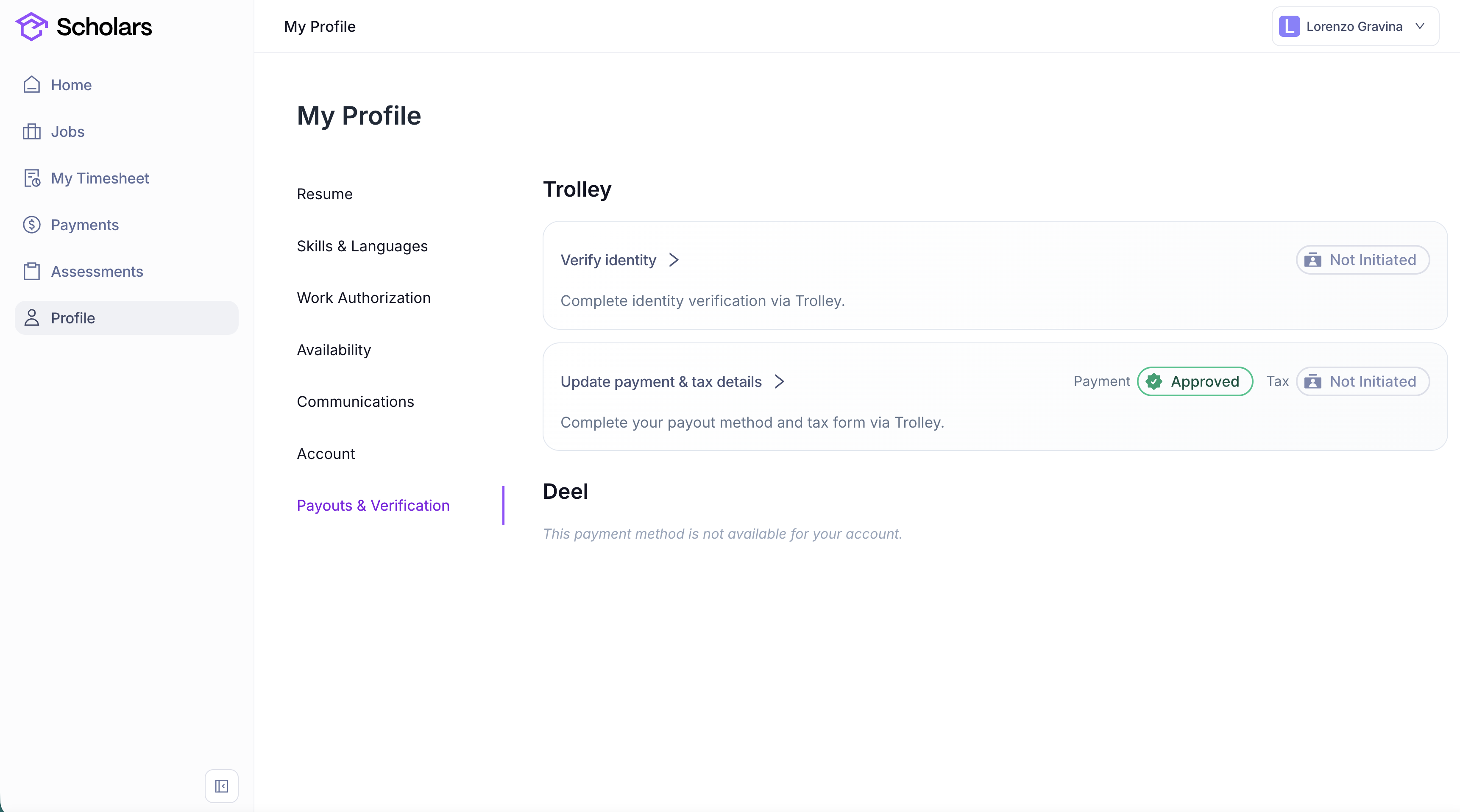
Go to your profile page, then to *Payouts & Verification*.
{% endstep %}
{% step %}
If Trolley is available for your account, click *Update payment & tax details* and follow the steps on screen to add a payout method.
If Deel is available instead, click *Go to Deel* and add your payout method there.
{% endstep %}
{% step %}
#### Check your payout currency and estimated fees
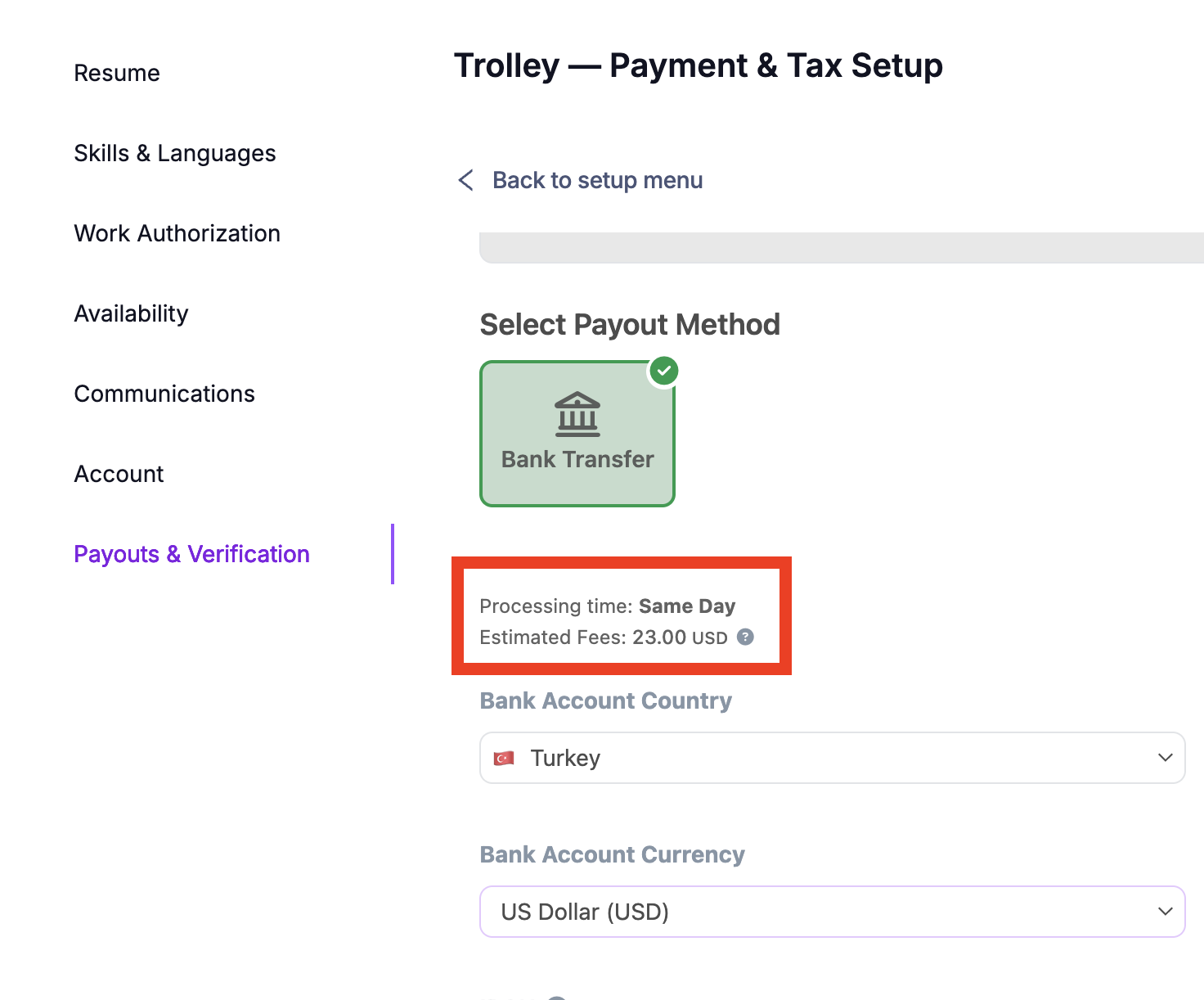
If you use Trolley, check *Bank Account Country* and *Bank Account Currency*, then review *Estimated Fees* under *Select Payout Method* before saving your bank details.
{% hint style="warning" %}
We recommend receiving payments in your local currency to help avoid banking fees. If you choose a non-local currency, a banking fee may apply to every payment you receive. Always check *Estimated Fees* for your selected payout method and currency.
{% endhint %}
The 23.00 USD fee shown here is an example. Your estimated fees depend on your bank account country, currency, and payout method.
{% endstep %}
{% step %}
Complete your tax setup from the same area. For detailed instructions, see [Set up your tax information](/how-to/set-up-your-tax-information.md).
{% endstep %}
{% step %}
If the page shows an identity verification step, click it and follow the prompts to verify your identity.
{% endstep %}
{% step %}
Return to the setup menu and check the *Payment* badge. It shows a green *Approved* status when your payout method is ready.
{% endstep %}
{% endstepper %}
### As you are accepting an offer
Follow the steps outlined in the following page on accepting an offer:
{% content-ref url="/pages/u2LoBSeomScuIFgLNN0z" %}
[Accept or reject a job offer](/how-to/accept-or-reject-a-job-offer.md)
{% endcontent-ref %}
### Add a Revolut bank account from another country
If your Revolut bank account is registered in a different country from your Trolley profile, follow these steps to add it.
{% stepper %}
{% step %}
#### Open Trolley
Go to *Profile* > *Payouts & Verification* and click *Update payment & tax details*.
{% endstep %}
{% step %}
#### Temporarily change your Trolley profile country
Inside Trolley, change your profile country to the country of your Revolut bank account.
{% endstep %}
{% step %}
#### Add your Revolut bank account
Add and save your Revolut bank account in the payout settings.
{% endstep %}
{% step %}
#### Restore your actual country
Return to your Trolley profile and change the country back to your actual country. Save this change before leaving the setup.
{% endstep %}
{% endstepper %}
This temporary change is made only inside Trolley. Keep your country of work in *Profile* > *Work Authorization* accurate throughout.